Enhance Angular.js Directive - ngRepeat
- Patrick Miller
- Programming
- March 16, 2013
Recently I started a social Phone Gap project for a client and decided it would be wise to use a JavaScript framework. It was first suggested that I look into Backbone.js. I investigated it and did a little research and digging. I looked at Backbone.js, jQuery Mobile, Ember.js, various others, and Angular.js. The long and the short is I read a slew of reviews, some documentation, a bunch or tutorials, and in the end I decided to go with Angular.js for my framework of choice.
I’ve spent the last 2+ years developing in Python / Django and I found Angular.js to be familiar and very enjoyable to work in. The actual project I selected it for will be called ‘Dealtribus’. The client’s core concept is that business entrepreneurs and the like can use this to network their business deals. Similar to Linkedin only for deals instead of job networking.
Slider View
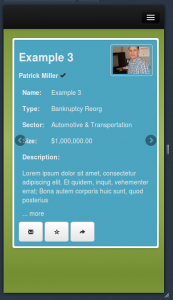
One of the clients requirements was that they be able to browse through the list of deal result summaries one at a time by swiping left and right to navigate between each one. I approached this by selecting a responsive JavaScript jQuery carousel plugin and building the list of results using the Angular.js ngRepeat directive.
HTML Partials
<!-- parent template -->
<div id="slider-container fixed">
<div id="browser" class="row-fluid flexslider">
	<!--Body content-->
<ul class="deals slides" ng-include="'app/partials/deal/_list-summary.html'"></ul>
	</div>
</div>
<!-- include app/partials/deal/_list_summary.html -->
<li class="well well-small " ng-repeat="deal in deals">
<div class="fixed">
<!-- some content here -->
</div>
</li>The first partial HTML template is included via the ngView directive and the $scope is passed to the Controller for any processing after which the template is compiled / rendered with the $scope from the controller which you’ll see hereafter. The second partial HTML template is the individual deals which will be viewed individually as a single slide.
JavaScript Controller
/** app/js/controllers.js **/
var DealListSummaryCtrl = ['$scope', '$routeParams', 'Deal', function($scope, $routeParams, Deal) {
    $scope.deals = Deal.query();
}];
Right now is a very basic controller which retrieves the Deal models and passes them to the view in the $scope. Simply put the deals will be listed using the ngRepeat directive as seen in the _list-summary.html as ng-repeat="deal in deals". The only problem was there is no event emitted when the repeat part is complete. There is an event fired for the ng-incldue directive in the first template, which is $includeContentLoaded, it however was firing before the repeat directive had finished and so the slider plugin wouldn’t initialize everything correctly.
Directives
You can create your own directives for just about anything. In this case I needed one that would fire / emit an event after the loop had finished.
/** app/js/directves.js **/
'use strict';
/* Directives */
angular.module('dealtribusDirectives', [])
	.directive('ngRepeatFinished', function() {
		return function($scope, element, attrs) {
			if($scope.$last) {
				$scope.$emit('$ngRepeatFinished', {});
			}
		};
	});
<!-- app/partials/deal/_list-summary.html modified -->
<li class="well well-small " ng-repeat="deal in deals" ng-repeat-finished>To the best of my current understanding this declares a directive which will be applied to an HTML element when the HTML view is compiled and rendered, such that for each new deal that is added to the DOM this directive is called with the $scope, the current element, and any additional attributes. As ngRepeat loops it adds some loop variables to the $scope, one of which is $scope.$last, a boolean. It will be false until it reaches the last item in the deals array. And then the $ngRepeatFinished event is fired / emitted.
Now we can change the controller to add the Flexslider plugin.
/** app/js/controllers.js modified **/
$scope.$on('$ngRepeatFinished', function() {
		$scope.slider = $('.flexslider').flexslider({
			animation: 'slide',
			animationLoop: false,
			slideshow: false,
			controlsContainer: '#slider-container',
			controlNav: false,
			itemWidth: $('.flexslider').width(),
			startAt: ($routeParams.index) ? parseInt($routeParams.index) : 0,
		});
	});
$scope.settings = settings;
Now the slider plugin will be initialized more reliably than if I had tried to add a call to setTimeout.